LensSOAPTracer installation
In order that Your computer would be capable of sending data from the tracer into LensWare web order system, You must a have a LensSOAPTracer program installed. Please follow these steps in order to install this program:
- Go to LensSOAPTracer program download page.
- Choose the program version according your operating system (Windows / Mac) and download the installation file.
- Run the installation file and install the program.
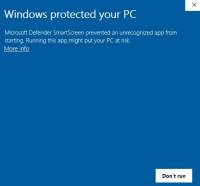
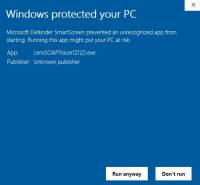
In some cases Windows Defender might show a message on blue windows informing that the program that you are about to install is not confirmed by Microsoft. This is normal behaviour and in this case You just click the “More Info” and then “Run anyway”.


After successful installation program icon should appear at the task bar: